Saturday, 30 July 2016

Foldable Unique Tent-Like Mosquito Net With Free Delivery in Lagos

This Foldable Mosquito Net Tent helps keep you and your loved ones from mosquito, insects and dust particles. It is very handy and useful for camping and outdoor events. It is supported by flexible steel wires which gives it a sturdy structure when unfolded. It is made of high grade pure white terylene mesh yarn with super breathability.


Price: N7,500
NB: Delivery is free within Lagos. Outside Lagos, delivery fee applies
Scroll Down to place orders. On the message box give :
1. Your phone number for contact.
2. Full address for delivery
3. Quantity needed

Sunday, 3 November 2013

BROWSE AND DOWNLOAD UNLIMITEDLY WITH HORIZONVPN ON MTN AT 0.00!!!


1. Configure your Modem with normal MTN apn "web.gprs.mtnnigeria.net"

2. Download HorizonVPN HERE

3. Right click on the HorizonVPN and run as administrator to open.

4. Select TCP

5. Select server ports. Under remote port select other and put 1110 into the box, under Local Port, select other and put 5222.

6. Put username and password, click connect. It would show ESTABLISHING... In 10 secs it shows Establishing, click on the reconnect button just after the CONNECT/DISCONNECT button. Watch it connect.

7. Open your browser and browse. Opens all sites and You need not have airtime or any subscription on your MTN sim.


CONTACT ME for TRIAL Accounts!!!

Premium:
1month ---------------- N800 bank deposit
3Months----------------N2000 bank deposit

BANK DETAILS:

ACC NAME: ORANETO OGECHUKWU GEOFFREY
ACC NUMBER: 0053383301
BANK: ACCESS BANK


ACC NAME: ORANETO GEOFFREY OGECHUKWU
ACC NUMBER: 0046781562
BANK: GTB


RECHARGE CARDS are accepted!!!! 1000 naira recharge card for a month.

CONTACT:
08094566790
08051121755
skype: ogetogeo

For those still having issues, please watch this video tutorial: HERE

Wednesday, 16 October 2013

UNLIMITED BROWSING AND DOWNLOADS ON MTN!

PLEASE NOTE: This does not work on all MTN-NIGERIA SIM Cards.
Prerequisite: You NEED to download and use Tweakware VPN v4 for this. HERE

1.  Configure/Set your Modem's access point to "web.gprs.mtnnigeria.net" then connect to the Internet.


2.  Set up Tweakware VPN as follows:
-- On the Main screen, Select any server from the drop-down list and tick protocol "TCP".
-- Click Settings and fill in your Username and Password (Premium account).
-- Make sure "use proxy for tcp" is NOT ticked. (untick it if it is). -- Tick on "R.Port For Connect" and type 5222 OR 554 on the box beside it.
-- (If no TAP Driver is installed on your PC): Click Utilities and click on "Install TAP 32 Adapter" and allow it to finish.

3.  Connect Tweakware VPN and wait till it successfully connects, then set your Internet applications to use No Proxy.

If it takes too long to connect, right-click on the "connecting..." button and click force disconnect then reconnect.

If you encounter any errors while connecting kindly read the following tips to correct the problem:

"Authentication Failed!" error: Please check your username and password. 

For premium Account:
30days...................................................................700
90days...................................................................1800

PAYMENT MODE:
Acc Name: ORANETO OGECHUKWU G
Acc Number: 0053383301
Bank: ACCESS BANK

Acc Name: ORANETO GEOFFREY OGECHUKWU
Acc Number: 0046781562
Bank: GTB
CONTACT:
08094566790
08051121755

Tuesday, 17 September 2013

HORIZONVPN NOW WORKS ON ANDROID 2.3 & ABOVE, ALSO WORKS ON IPADS/IPHONES WITH OVER 40 SERVERS!!!


FOR ANDROID 4.0 AND LATER.

Requirements:

1. Android OS 4.0 or later
2. OpenVPN Connect apk from your google play store.
3. HorizonVPN Server files.

PROCEDURES

1. Download the OpenVPN apk from the play store or HERE
    Download ES File Explorer apk
    Download HorizonVPN Servers

2. Install OpenVPN Connect and ES File explorer to your phone.

3. Extract HorizonVPN Servers files (Using ES File explorer) to your SD Card root directory.

4. Open the OpenVPN Connect and import profiles from your SD card.


5. Subscribe for MTN BIS plan and create a new apn: blackberry.net and set it as default. It can be the monthly(BBC to 21600 @1k), weekly(BBCWEEK to 21600 @ 5H) or daily(BBCDAY to 21600 @1H).

6. Input your Username and password and click on CONNECT.


7. A similar window would appear like this once connected. Then click on the home button to minimize and start browsing.


FOR ANDROID 2.2 AND ABOVE.

Requirements:

1. Rooted phone.

2. HorizonVPN Server Files.
3. OpenVPN Installer, Settings and Busybox APK.

Procedure:

1. Download and Install these files:
OpenVPN Installer
OpenVPN Settings
Busybox
ES File Explorer
HorizonVPN Server Files

NB: Do not install Busybox if you are using a Custom ROM (ie cyanogen), using root explorer navigate to /system folder and determine if busybox is installed in folder bin or xbin

2. Extract the HorizonVPN Server files to the sd card root directory.

3. Input Account details (username/password), navigate /sdcard/openvpn/ and edit account.txt


4. Open OpenVPN Installer

Allow super user request for 3 times
Green Icon would appear after successful Installation.
Chose /system/bin if your busybox is installed in that directory (custom ROM)


5. Open Busybox

Allow superuser request and chose /system/xbin if asked between smart and manual install, chose manual.


6. Open OpenVPN Settings


7. Chose Server and connect.

Allo SuperUser request. A similar window would appear once connected.

NB: Android 2.3 and below requires a working tun.ko specified for your device. Tun.ko is already preloaded on custom ROMs and android 4.0 and above, so no need to worry.


FOR IOS DEVICES (IPAD/IPHONES/IPADMINI/IPOD TOUCH).

Requirements:

1. Apple devices (iPad, iPhone, iPad mini, iPod Touch)
2. IOS 5.1 and later. (Jailbroken or not Jailbroken)
3. PC or Laptop with iTunes sync to the device
4. OpenVPN Connect.
5. HorizonVPN Server Files.

Procedures:

1. Download and Install the OpenVPN Connect from the apple store.

2. Sync your iOS device to your iTunes installed on your PC/Laptop to import the HorizonVPN Server files.

3. Download HorizonVPN Server Files

4. Extract the HorizonVPN Server Files.

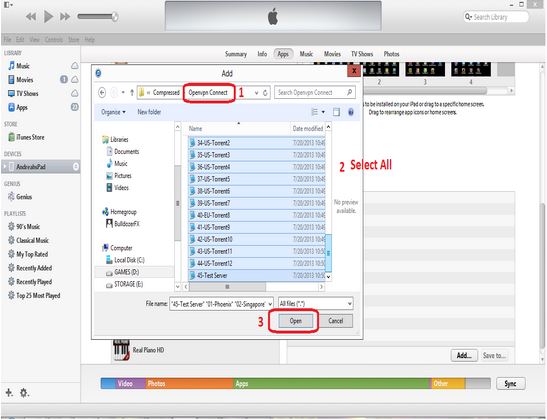
5. Open iTunes and import the Server files to the OpenVPN Connect.

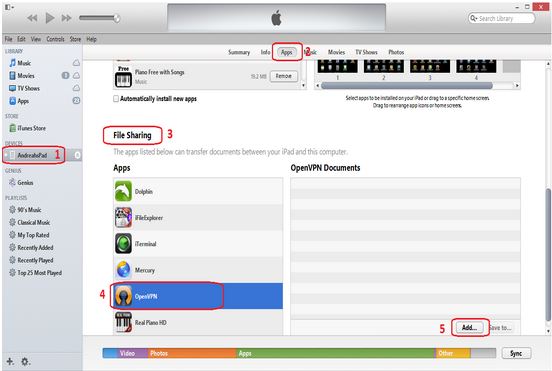
a.) Chose your device. b.) Go to Apps  c.) Scroll down to file sharing  d.) Click OpenVPN. e.) Click Add.


6. Chose the OpenVPN Connect folder you extracted before;


7. Wait until transfer is complete.


8. Go to your iOS device and open OpenVPN Connect. Click "+" to add a server profile


9. Click profile to chose a server to connect.


10. Once connected, you would see a window like this:


Then, Start browsing!!!


For Premium Account:

30 Days............................. N800
90 Days.............................N2000

PAYMENT MODE
BANK DEPOSIT OR TRANSFER:

ACC NAME: ORANETO GEOFFREY OGECHUKWU
ACC NUMBER: 0046781562
BANK: GTB

             OR

ACC NAME: ORANETO OGECHUKWU G.
ACC NUMBER: 0053383301
BANK: ACCESS BANK


Once Payment is made send the teller number, depositor's name,  preferred username and password to any of these numbers: 08094566790, 08051121755, 08120707432.


CONTACT:

E-mail:                                                      ogetogeo@gmail.com

Yahoo messenger:                                   ogetogeo

Skype:                                                      ogetogeo

Gtalk:                                                       ogetogeo

Monday, 22 July 2013

NO NEED ROOTING!!! OPENVPN + MTN BIS ON YOUR ANDROID IPAD/IPHONE!


ANDROID

1. Go to Playstore, search, download and install OpenVPN Connect.

2. Download the VPN config files HERE

3. Extract the file to the root of your SD card.

4. Get MTN active BIS sim and set the apn to blackberry.net

5. launch OpenVPN Connect, tap option > import profile from SD Card, then locate the config file you extracted to your storage device and select ok to allow OpenVPN Connect to save profile ( do this for all config profiles).

6. Now go back to OpenVPN Connect and select your favorite VPN server from the list.

7. Enter your username and password, then connect


IPAD/IPHONE

1. Go to Appstore, search, download and install OpenVPN Connect.

2. After installation, plug your iphone/ipad to your computer and lauch iTunes.

3. Navigate to the Apps installed on your phone and select OpenVPN icon.

4. Download the VPN config files for iphone/ipad HERE

5. On your right hand side, just before the OpenVPN Connect, there is a document box. Drag and drop the content of the VPN config files for iphone/ipad.

6. Launch the OpenVPN Connect app that you have installed on your iphone/ipad. You will see the new config files you dragged waiting to be accepted, press the "+" button to accept them all.

7. Select your favorite VPN server, put your username and password. Then connect!

NB: You can turn on the save button under the username/password area to save them, saves you the stress of always typing them in each time you want to log on.


For premium account.

30days ...................... N800

90days.......................N2000

PAYMENT MODE:

BANK DEPOSIT OR TRANFER

ACC NAME: ORANETO GEOFFREY OGECHUKWU
ACC NUMBER: 0046781562
BANK: GTB

ACC NAME: ORANETO OGECHUKWU G.
ACC NUMBER: 0053383301
BANK: ACCESS BANK


CONTACT:


E-mail:                         ogetogeo@gmail.com

 Yahoo messenger:                ogetogeo

 Gtalk:                          ogetogeo

 Skype:                          ogetogeo

 Phone:                          08094566790
                                 08051121755
                                 08120707432

Once payment is made, send your payment details to any of the contacts up there with the username and password you want to use, we will get back to you in less than 5 minutes.

Monday, 4 March 2013

CHEAPEST VPN AND 40 SERVERS: HORIZON VPN WITH MTN BIS/MULTI LINKS- VALUE FOR MONEY!!!


Welcome friends to a more subsidized VPN and with extra servers, 40 servers in all. This is a great value for money and in line with our resolve to always serve our clients with the cheapest way to get connected and still get optimum performance.

Lets roll!!!

MTN PC USERS CONFIGURATIONS
   
1: Subscribe to MTN blackberry plan either weekly or monthly
              Text BBCWEEK to 21600 for 1 week subscription costs N500
              Text  BBC to 21600 for 1 month subscription costs N1000

 2: Configure your modem apn to blackberry.net

 3: Download Horizon VPN HERE

 4: Install the software and Run As administrator

 5: Insert your username and password

 6: Under server & protocol choose UDP and then in the front of the UDP select any server you like

 7: under OPTION MENU  , click SERVER PORT , under remote port choose other and insert 500 and under Local port choose other and insert 1110

FINALLY CLICK CONNECT.

 DOWNLOAD  IS UNLIMITED!!!


MULTILINKS PC USERS CONFIGURATIONS

 1 : Just follow step 3 to 5 above

 2 : under OPTION MENU  , click SERVER PORT , under remote port select 9200 and under Local port choose other and insert 5152 or 8788

FOR  WINDOW XP  USERS
make sure you have dotnet installed on your pc or download it HERE


FOR UNLIMITED ACCOUNTS

30 DAYS..................................... N800

90DAYS......................................N2000


PAYMENT MODE:

BANK DEPOSIT OR TRANFER

ACC NAME: ORANETO GEOFFREY OGECHUKWU
ACC NUMBER: 0046781562
BANK: GTB

ACC NAME: ORANETO OGECHUKWU G.
ACC NUMBER: 0053383301
BANK: ACCESS BANK

VISA ATM/ VOGUEPAY/ POCKETMONI

30 DAYS.............................................N800


90DAYS ............................................ N2000


CONTACT:


E-mail:                         ogetogeo@gmail.com

 Yahoo messenger:                ogetogeo

 Gtalk:                          ogetogeo

 Skype:                          ogetogeo

 Phone:                          08094566790
                                 08051121755
                                 08120707432

Once payment is made, send your payment details to any of the contacts up there with the username and password you want to use, we will get back to you in less than 5 minutes.


Thursday, 21 February 2013

HOW TO GET UNLIMITED DATA ON YOUR 'ROOTED' ANDRIOD PHONE AND TABLETS!!!


Hello friends and fans of this blog, today as has always been our custom on this blog, I bring to you another way of enjoying your andriod devices to the full with multiple applications at a very cheap data rate.

We all know how andriod OS guzzles data like no man's business, this have always put a strain on the pocket of the average Nigerian, who also wants to enjoy the benefit of a smart phone.

There is a goodnews today, this method has been working since last year, I only decided to bring it out now, seeing that GLO just put a strain on their BIS services that we all once enjoyed on other devices.

THINGS NEEDED

1. A rooted andriod device, phone or tablet.

2. An MTN sim.


Once you have the above, you can then contact me for the settings and a premium acccount for the VPN.

CONTACT:


E-mail:                         ogetogeo@gmail.com

Yahoo messenger:                ogetogeo

Gtalk:                          ogetogeo

Skype:                          ogetogeo

Phone:                          08094566790
                                08051121755
                                08120707432


PREMIUM ACCOUNT:


ACC NAME: ORANETO GEOFFREY OGECHUKWU
ACC NUMBER: 0046781562
BANK: GTB
AMOUNT: N1500.

You can also purchase a premium account using your VISA ATM, VoguePay or PocketMoni here:


Sunday, 27 January 2013

WATCH LIVE FOOTBALL MATCHES, LIVE MOVIE AND NEWS CHANNELS ON YOUR ANDRIOD PHONE, TABLETS AND LAPTOPS.


Hello friends, I trust you are all doing great. Today I will be showing you something that will blow your mind away.

I will be showing you simple steps on how you can watch you favorite football matches, news and movie channels live on your andriod phones and tablets. This software will give you access to over 30 channels both free to air and paid channels all for free. Na only your data and battery go suffer sha....lol

Don't be scared if you hear of andriod phones, they are all expensive. Even the cheap ones of about N13,000 can do all these.


STEPS

1. Download MX Player from googleplay or google market.

2. Install the MX Player you downloaded.

3. Go to HERE , download and install the software.

4. Make sure you have an active data plan, then run the software you downloaded.

5. Select the category you want and select the channel you want to watch.

6. Bingo! Happy streaming.

SOCCER STREAMING LINKS ON LAPTOPS.

1. LINK 1

2. LINK 2

3. LINK 3

NOTE:

It takes about 250mb to watch a full game of 90 minutes.
I know you will be wondering how you will be able to pay 1k, just a match if you do not have access to a wifi.
I have a goodnews for you. You can get real cheap data for your streaming here:

1. For your andriod cheap data plan HERE.

2. For your system cheap unlimited data plan HERE


Remember, We love Comments!
You can also support us here:
Enter Amount

Friday, 25 January 2013

GET GLO 3GIG FOR JUST 1200 NAIRA


Hello people and happy new year to all the fans of this blog. Its has been quite a while i dropped something here due to some underground jobs i have been engaged in lately.

I won't let this month pass without dropping it like it's hot always. Today, i will be showing you how you can get 3gig of data from GLO with a meager N1200, this data you can use on your phone be it andriod or symbian, also on your system and tablets.

Just follow these simple steps:

1. Get a GLO browsing sim card.

2. Recharge with N1200 recharge card.

3. Send "SOMONTH" to 777 ( Yes, i know it is for BIS but relax, we have found a way to make it work on other phones, tablets and system).

4. Change the APN on your phone or modem software from gloseccure to blackberry.net.

5. Remove your sim and replace it. You are now good to go.

6. You can check your data balance by sending "STATUS" to 777.

NOTE: You might be getting a message that your plan has not been activated but don't bother you can browse for as long as you want till their system recognises you.. lol

Happy browsing and do not hesitate to drop your COMMENTs and QUESTIONs here. 

Tuesday, 20 November 2012

AVG 2013 ANTI-VIRUS (32-BIT AND 64-BIT) + PRODUCT KEY FOR FREE!


Due to popular demand, today i will be sharing AVG 2013 anti-virus with the activation code for free.
All you have to do it to download the build for your system, install it and register it with any of the two serial keys i will be dropping.


Download AVG for 32-bit systems HERE


Download AVG for 64-bit sytems HERE


Use any of these keys to activate and register the AVG.


 8MEH-RGM33-K474L-6FGRR-8RR7K-UEMBR-ACED


  8MEH-RF3MY-BZ7CJ-9LUAR-ST99N-CEMBR-ACED


Remember to drop a thank you comment, we love COMMENTS!
You can also support us here:
Enter Amount


Friday, 9 November 2012

UNLIMITED BROWSING WITH ETISALAT + PROXY!


In continuation to bringing almost free unlimited browsing to the fans of this blog, i am unleashing an ETISALAT stuff based on popular demand.

For some months now i have been helping friends with unlimited browsing and downloading using MTN+SANDWICHVPN one of the most stable and cheapest VPNs available.

But today I bring you another variant ETISALAT+PROXY.

STRONG POINTS

1. No BIS needed.

2. No etisalat subscription needed.

3. Connect with N0.00k o your sim.

STEPS.

1. Download the proxy software HERE

2. Configure your modem with the apn: etisalat.

3. Configure your browser with 127.0.0.1 and 8080

4. Pay for your 30 months premium account and get a username and password to log in.

5. Drop your questions here or chat with me on yahoo messenger @ ogetogeo.


PAYMENT DETAILS:
ACC NAME:          ORANETO GEOFFREY OGECHUKWU
ACC NUMBERE:   0046781562
BANK:                   GTB
AMOUNT:             N2000


After payment, send your teller number and depositor's name to:
08120707432, 08094566790.


Thursday, 8 November 2012

UNLOCKING NETWORK LOCKED BLACKBERRY FOR FREE!


In continuation of the freebies i started last week, this week i will be releasing a step by step guide on how to unlock network-locked blackberry.

Due to the recent frenzy for blackberry and its data management, more people are being lured into its use since it offers one the opportunity to use a smart phone and still pay less for data due to its friendly data packages.

This have increased the market base for fairly used blackberry phones especially those used in the western word, where most phones are used on contracts and therefore they are locked to that particular network. There is a great market for those phones since they come very cheap, the only challenge mostly is how to unlock it and use it on other gsm networks.

Normally one need to pay the company to unlock these phones. But the good news today is i will be giving u a software and steps to unlock your blackberry phones for FREE!

STEPS:
1. Download the BB unlock code calculator HERE.

2. Extract and open it.

3. Put your BB imei number and mep number as seen below.


4. Click calculate and you will get this:


5. Copy out the MEP2. This is your unlock code.

6. Put your new sim into the BB phone, switch it on and then input that MEP2 code you copied and OK!

7. Congratulations your BB is now free!


Please, do drop comments or questions.

WE LOVE COMMENTS!


Sunday, 4 November 2012

The Most Powerful Money Making Program In Nigeria Today!


      You can’t grow beyond what you know – Anonymous. Every day and night I keep studying books and browsing the internet constantly for vital information that are capable of improving my Self and Net worth.
      As one of my Code of Conduct which is “Helping Others Succeed”. I have decided to unveil to you a discovery that blew me off my chair and kept me screaming Eureka!
                      Introducing The Prestigious Onwealth Club
      Onwealth Club is a membership site created by the internationally known guru Anthony Chukwurah, he is the MD of Antlead Innovations LTD.  I have come across a lot of membership site but this one I must confess is ultra exceptional and unique, more grease to your elbow Sir, may God continue to bless you with more wisdom.
      I won’t full you with many benefits out of sentiment, as usual I will KISS i.e. Keep It Short and Simple, I will just go straight to the point so just follow through.
      As a member of this club you will get to enjoy many mouth watering opportunities like; how and where to import second handed cars for as low as $500 (N80k), where to buy high quality UK used laptops for as low as N12k with where to buy UK high quality slightly used Blackberry phones for as low as N7k, that is not all you will discover hidden proven investments of over 30 years that banks do that can earn you more than $20 - $100 daily (This is one of my major stream of passive income), he has also uncover an e-book that will teach you how to create a website in less than 60 minute I guess you might doubt that, other opportunities included are; how to start a bulk SMS business with virtually no start up capital, another mind blowing information contain in the membership area is how to buy from Paypal without funding your Paypal account and how to easily buy from Clickbank directly in Nigeria the list are countless and the information are invaluable, because of his generosity and passion of making you rich, he has also decided to give you back 2/3 as commission for every one you refer, that’s a whopping N10k with that alone a lot of smart guys have start earning N 300k - N500k monthly by helping others succeed, you will get to discover more when you visit the site.   
       Now, I believe you can’t afford to ignore such an opportunity except you know it all, I am also sure that by now some questions will be running through your mind like how do I become a member?, what is the membership fee?, can their be a discount for me? Etcetera, well don’t worry, just read through the next paragraph carefully.
       Firstly, in order to join visit www.onwealthclub.com/default now, on the top left hand side of the site click on Join here (Make sure your sponsor’s username is “default”), fill in your details and click on submit. Secondly, membership activation fee is N15k only, I think it worth it. Thirdly, there is no discount on membership fee period.
       But as an appreciation for reading through this article and as my own contribution towards your success I will refund to you N5k after you activate your account alongside a special bonus pack worth more than N5k free. Just reach me via allabove16@yahoo.com with the subject “Onwealthclub Refund Plus Bonus”, make sure you include your Username, Full Name, Email address and Mobile number. Act Now And Grow Rich.
       PS: In other to receive my refund and free bonus pack make sure you join using this link www.onwealthclub.com/default.  Thank you for reading, hope to see you at the top! 


NB: This is a guest post from Everest. A good friend.


Thursday, 25 October 2012

UNLOCK YOUR STUBBORN (ZTE) ETISALAT, AIRTEL, MTN AND GLO MODEM FOR FREE AND USE IT WITH ANY GSM NETWORK.

Greetings to our numerous fans, it has been a while but we are back with a bang!

We will be blowing your minds with some freebies in the coming days, just get your pop corn and book your space (smiles).

Back to business, today i will be unearthing a very simple, yet useful information for you all. I will be virtually taking you by the hand and giving you step by step on how to UNLOCK NETWORK LOCKED MODEMS, so as to be able to use them on any network of your choice.

You no longer need to have all the network modems, you can now use your single modem on any network once you unlock it. I mean you can now use MTN modem on AIRTEL, ETISALAT  or GLO and vice versa.

There are two major makers of 3G modems, they are HUAWEI and ZTE . HUAWEI is quite easy to unlock with generated codes. So, just drop your imei number for HUAWEI and request for unlock code but the following steps are for the ZTE mainly, it can also be used for HUAWEI though.


                                                           STEPS:


1.Download TOGEO UNLOCKER.

2. Put a different sim into your locked modem and plug into your system. It will display something like this;


3. Click 'CANCEL', open the TOGEO UNLOCKER you downloaded. Extract the unlocker, open the unlocker, select ZTE datacards and click on the 'microscope icon' to auto detect as seen below:


4. Clicking the 'microscope icon' will automatically detect the model of the modem, then click on unlocking at the top right-hand corner.


5. From the drop-down select 'unlock'.


6. This is what you will get and pronto! Your modem is free to be used with any network.


NOTE: You need to create a new profile for any new network you want to use on your unlocked modem.
REMEMBER: Drop the imei numbers of your HUAWEI modems and request for code in the comment box.


WE LOVE COMMENTS.

You can also make donation here if this software helped you:
500


Wednesday, 3 October 2012

THREE EASY STEPS TO MAKE SOME MONEY INTO YOUR NIGERIAN ACCCOUNT.


Some people don't believe that there are ways of making money on-line legitimately but i want to destroy that myth and show you some easy ways you can get started.
Today i will be showing you one of my methods, which is easy to understand for any body at any level and do not need you buying or selling anything.

WHAT YOU NEED TO GET STARTED:
1. A phone that can browse or a PC.
2. An account number.
3. A phone number.


STEPS TO GET STARTED:
1. Register 4 free  HERE and get your Invitation Code (IC).
2. Activate your account with 1500.
3. Start inviting people with your IC and making 1500 for each you invite, the money is paid into your account directly.


NOTE:
1. You don't need to buy or sell anything.
2. You don't pay no commission to anyone.
3. You just register people and get your account credited
4. You don't need  degree for this.
5. You can do this during your free time.
6. Invite your friends on facebook, twitter, 2go, whatsapp, BBM, forums, blogs and so on.
7. You can make N15,000 a day, if you invite and register 10 people a day.


WHAT ARE YOU WAITING FOR?
Get registered, Start inviting people and keep smiling to the bank at your own pace.
No limit to the number of people you can register.

For more info and questions call: 08120707432.
                       yahoo messenger: ogetogeo
                       Skype : ogetogeo

Sunday, 9 September 2012

MTN BIS OR MULTI-LINKS PLUS SANDWICH VPN (UNLIMITED DOWNLOADS).


Hello friends, in continuation to my previous post on cheap browsing. I want to give the breakdown and steps to get it done due to popular demand.


Go to Here
Register and get a demo account
Download the SANDWICHVPN.

.


INSTRUCTIONS:
    On win7 users must execute the installer on run as admin ( right click on icon and choose run as admin)
    On winxp users, DOT NET is needed before the SandwichVPN installation
    During its first run it will ask for a driver install just press yes.
    Input your username and password on its proper field.
    Set proper protocol for your area and press connect.
    Once it connects the software will minimize to system tray and is ready to use

Note:


    Always make sure that you have typed correctly your account.

    Always be sure the program has administrative privileges when using Vista/7

    Always be sure you have an active internet connection.

    Always be sure to always run as admin during use. ( or you can set on its properties>compatibility>check always run as administrator )


FOR MTN USERS


  Subscribe for BIS plan.
BBCWEEK to 21600--#500
BBC to 21600---#1500

Protocol:  UDP........MTN_NG
Server: DEMO ( You can only use this server unless you upgrade to premium account).

MULTI-LINK USERS


No need to subscribe to any plan on multi-links (Use the white EVDO 3G broadband modem).
Protocol: UDP ...... Multi-links.
Server: DEMO (free users but limited bandwidth and speed)

Click CONNECT.


NOTE: With DEMO server you are limited to about 50mb per day and limited speed. To enjoy UNLIMITED bandwidth and MAXIMUM speed, you need to upgradeI can help you with the upgrade.

Premium account upgrade price: N1000.
PLEASE: PAY INTO THE ACCOUNT BELOW (NO MORE CARDS)

ACC NAME: ORANETO GEOFFREY OGECHUKWU
ACC NUMBER: 0046781562
BANK: GTB
AMOUNT: N1000.

Once you pay text the teller number and your name to the numbers below and you will get your voucher through the number you text with immediately payment is confirmed.
Call: 08094566790 or 08120707432.

You can also buy vouchers here using ur VISA ATM cards, VoguePay or pockemoni:
VPN VOUCHERS